Fiber Optic Patch Panel Oman, ODF 8 to 48 Ports, Loaded or Unloaded
Fiber optic patch panel (ODF) from 8 to 48 ports, loaded or unloaded. SC, LC, FC or ST adapters, UPC or APC, single mode or multimode. Rack or wall mount. Price by quote: send your fiber count and connector type on WhatsApp +968 78109286.
Price on request
Send your requirements on WhatsApp and we reply with a quote.
Open every day, 8:00 am to 10:00 pm
- Authorized dealerOfficial brand distribution
- Supply and installationOur own technicians across Oman
- Manufacturer warrantyClaims handled locally in Oman
Overview
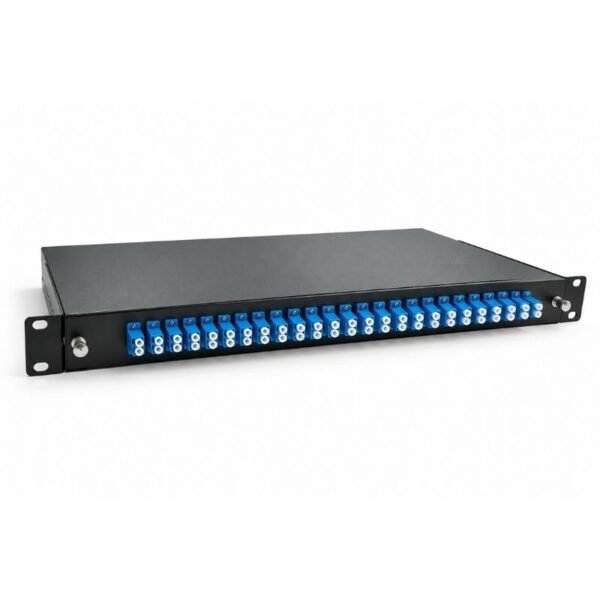
A fiber optic patch panel, or ODF, is the steel box where incoming fiber is spliced and connected. An APC adapter will not mate with a UPC patch cord, so match connector, polish and mode first. Aurex Smart Systems supplies the fiber optic patch panel Oman installers use, from 8 to 48 ports, loaded or unloaded. Every panel is quoted to your job.
Fiber Optic Patch Panel Oman: Port Counts and Mounting
Pick the port count first, because it sets the mounting and the connector options.
| Ports | Mounting | Connector options |
|---|---|---|
| 8 and 12 | Rack or wall mount | SC, LC, FC, ST |
| 16 and 24 | 19 inch rack, 1U | SC, LC, FC, ST, E2000 |
| 36 and 48 | 19 inch rack, 1U or 2U | SC, LC, FC, ST |
A 48 port panel in 1U normally uses LC duplex adapters. SC adapters are larger, so 48 SC ports usually need 2U. We confirm the panel height when we quote.
Loaded or Unloaded Fiber Patch Panel: What Is in the Box
| Item | Loaded | Unloaded |
|---|---|---|
| Panel with splice tray | Yes | Yes |
| Adapters for every port | Yes | No |
| Pigtails for every port | Yes | No |
| Heat shrink splice sleeves | Yes | No |
| Cable ties, screws and mounting parts | Yes | Not listed |
| Fusion splicing on site | No | No |
Choose a loaded fiber patch panel if you want it ready to splice. Choose unloaded if you already hold parts, or need a mix of connector types. For an unloaded panel, add a fiber pigtail and an LC fiber adaptor for each port.
APC or UPC, SC or LC: Match the Connector First
This is the choice that decides whether the link works. Blue adapters are UPC and green adapters are APC. The two polish angles do not mate, and mixing them causes high loss and can damage the end faces.
| Connector | Where it is used |
|---|---|
| SC | Most ODFs, media converters and FTTH |
| LC | SFP modules and high density panels |
| FC and ST | Telecom and older equipment |
| E2000 | Available on 16 and 24 port panels only |
Fiber mode must match as well. Single mode OS2 is yellow and suits long runs, CCTV and telecom. Multimode OM3 is aqua and suits short runs inside buildings. The panel, pigtails, patch cords and fiber optic cable must all be the same mode.
How Many Ports Does Your ODF Fiber Patch Panel Need?
Count fibers, not ports. An SC simplex port carries one fiber. A duplex LC adapter carries two fibers in one position, so confirm how the panel counts its ports.
| Cable core count | SC simplex panel we suggest |
|---|---|
| 8 core | 8 port, or 12 port for spares |
| 12 core | 12 port, or 16 port for spares |
| 24 core | 24 port, or 36 port for spares |
| 48 core | 48 port |
Leave spare ports when the site may grow. Moving to a bigger panel later means splicing every core again.
Rack Mount Fiber Patch Panel Specifications
| Item | Detail |
|---|---|
| Port count | 8, 12, 16, 24, 36 or 48 |
| Connectors | SC, LC, FC or ST, plus E2000 on 16 and 24 port panels |
| Fiber mode | Single mode OS2, or multimode OM1 to OM4 |
| Polish | UPC (blue) or APC (green) |
| Drawer | Sliding or fixed, with bend radius protection |
| Material | Cold rolled steel, powder coated |
| Color | Black or grey |
| Cable entry | Grommets with cable fixing |
| Insertion loss | Up to 0.3 dB, typical, adapter and pigtail |
| Operating temperature | Minus 20°C to plus 70°C |
| Dimensions and weight | Confirmed when we quote |
| Price | By quote |
Insertion loss is a typical figure. It depends on splice quality and how clean the connectors are.
How the Fiber Optic Patch Panel Fits Your Link
Each part of a fiber link connects in a fixed order. Knowing it helps you order everything at once.
- The cable enters through a grommet and is fixed to the panel.
- Each core is fusion spliced to a pigtail inside the fiber splice tray.
- The pigtail plugs into the back of an adapter.
- An LC to LC fiber patch cord links the front of the adapter to your switch, SFP or media converter.
Need a closed box on a wall instead of a rack? See our wall mount fiber patch panel.
Fiber Optic Patch Panel Oman Quote: What to Send
We do not show a fixed price, because every panel is built to the job. Send these details on WhatsApp:
- How many fibers you need to terminate
- Connector type and polish, for example SC UPC
- Single mode or multimode
- Loaded or unloaded
- Rack or wall mount, and any height limit
- Whether you need fusion splicing on site
We supply customers in Muscat, Sohar, Nizwa, Salalah, Sur, Duqm and every other governorate.
Fiber Patch Panel Questions
What is the difference between an ODF and a patch panel?
In most projects they are the same thing. ODF means optical distribution frame. Installers use both names for a panel that holds splices and adapters.
Can I connect an APC patch cord to a UPC panel?
No. APC and UPC end faces have different angles, so they cause high loss and can damage each other. Order the panel and the patch cords with the same polish.
Do I need a fusion splicer?
Yes. The cable cores are fusion spliced to pigtails inside the panel. If you do not have a splicer, tell us when you ask for a quote.
How much does a fiber optic patch panel cost?
The price depends on port count, connector type and whether the panel is loaded. We quote each job, so send your details on WhatsApp and we reply with a price.
Fiber Optic Patch Panel Oman: Order from Aurex Smart Systems
Aurex Smart Systems supplies the fiber optic patch panel Oman installers ask for, matched to your cable and equipment. Call or WhatsApp +968 78109286, or email info@aurexsmart.com. We answer every day from 8:00 am to 10:00 pm.
Technical data
Product Specifications
| Specification | Detail |
|---|---|
| Product | Fiber optic patch panel (ODF) |
| Port count | 8, 12, 16, 24, 36 or 48 |
| Configuration | Loaded (adapters, pigtails, splice sleeves) or unloaded (panel and splice tray) |
| Connectors | SC, LC, FC or ST, plus E2000 on 16 and 24 port panels |
| Polish | UPC (blue) or APC (green) |
| Fiber mode | Single mode OS2, or multimode OM1 to OM4 |
| Mounting, 8 and 12 port | Rack or wall mount |
| Mounting, 16 and 24 port | 19 inch rack, 1U |
| Mounting, 36 and 48 port | 19 inch rack, 1U or 2U |
| Drawer | Sliding or fixed, with bend radius protection |
| Material | Cold rolled steel, powder coated |
| Color | Black or grey |
| Cable entry | Grommets with cable fixing |
| Insertion loss | Up to 0.3 dB, typical |
| Operating temperature | Minus 20°C to plus 70°C |
| Not included | Fusion splicing, patch cords, fiber cable |
| Price | By quote |
You may also need
Related products
 Norden Category 6A CablesNorden Category 6A U/UTP 4 Pair Cable LSZHPrice on request
- Norden Category 5E CablesNorden Category 5E U/UTP 8 Pair Unshielded Internal CablePrice on request
- Norden Category 6A CablesNorden Category 6A U/UTP 4 Pair External CablePrice on request
- Norden Face PlatesNorden Back Box For Face PlatePrice on request